Contact


Showing posts with label Android. Show all posts

Friday, November 29, 2013

​​​​​​​​​​​​​​​​​​​​​​​​​​​​​​​​​​All Khmer News.apk program was established in order to note the Website news
In our country, which easily makes the user having to type Address Website
And easy access to the Website. The leading cause of Android Khmer
Create a program is visible because of a number of practical problems for users who have less known news website easy and not very practical.
Finally, we will receive and provide ideas or any of our scarce.
-Website larger number in the program are required to also have Khmer Unicode
Link to Android Khmer


Download
Resource : C.A.U.G


Do you want to use the Style iOS 7 on your Android, please download the files for installation below.


Download Zip 
*How to install
-->Extras Zip
-->install all apk in zip
-->choos IOS7 Launcher
-->Done


Currently, the use of the smart phone is getting better, especially Android, an open source operating system that's easy for Android users can change everything on Android.
Also recently, Android users opioids called CAUG test charging Convert Windows 7 ISO test running successfully on Android. And for Windows 7, which runs on Android features remarkable that we were able to install the file type * .exe had more, but it depends on the level of RAM your phone. And now, well, user groups Android opioids Cambodia would like to show how to Convert Windows 7 onto Android.
*Requiments
-must have Window7.iso or DVD as Windows 7
-Download Qemu Manager for Computer
-Download Bochs for Computer
-Download SDL.zip
-Download  Bochs.apk for Android smart phone
And install the application l downloaded all of the above in your Computer
*How to Convert
-Go to STAT - Allprograms - Bochs 2.6.2 - Disk Image Creation Tool
then it pop up Creat File C.img (Window)
-click hd
-click flat
-Select file size of Windows that you want to use in Windows 7 .it's size 3GB .we must set 3000M
-then write C.img
-Enter 

 and then open Qemu Manager
-click "+" red color for Creat Windows .Go to C.img that has been created.
Named Windows example: CAUG-Windows7
Put 512 RAM, 1GB or 2GB of your requirements
-Drive Type : Qcow (QEMU Image Format)
-Hardware Type: Standard 32Bit PC (0.9.0) QMQC
-Creat
Go to Drives
-Hard Disk 0 (find C.img in  C:\Program Files\Bochs-2.6.2)
-CD-ROM Image File find Window.iso that downloaded.
-Boot From CD-ROM set it to YES 
 and then Run Machine
 wait until finished.
 and then Copy C.img to Folder SDL that has been Download
-copy Foler SDL to your phone
-then Boch in your phone, it will  Boot to Window 7
Admin (Xperia Z) 

Resource C.A.U.G

Recently, Android momentum of rapid development. Android also looking to see the country has a lot of Android users to Developer
Android's decision to add Android Khmer. In Android 4.3 / 4.4 Khmer existing.

If you have not yet upgraded to 4.3 / 4.4 Click here to Update.So, Android users will show how to boot Windows XP Pack 3 in every Android phone Model RAM from 512MB up to
The need to install a Window XP

- Run Android
- 512MB of RAM, up to
- Compatibility Samsung / sony / LG / HTC / ......
+ How to Install
Installation Bochs2_5_1.apk in your Android Smart Phone, and not to open
Extract SDL.zip Copy Folder SDL to your SD Card
Open the Bochs it perfectly Run Auto Window XP.


Resource: http://www.caugtalk.info

Tuesday, November 12, 2013


Hi!Users all Android Smart Phones
If I know, I think this program is very popular for the avid photographer and want something unique
To share their photos on Facebook, Line, WeChat, Viber etc. ...
This directory is a program of the Chinese Hinckley Bejing BSHN wenhua chuanbo Ltd.

Initially, the program has a Chinese-language version only. Then modify the new version
There is also in English, and now this new collaboration translated into English, Chinese, Khmer, between friends on Facebook from miss  Helena Coolgirl  and mr  Chhoy Bun Sok Heng For about 2 weeks, plus editing icon and Khmer simple. Now they get out
Bali, and stepped download heard


Let your stuffiness and Khmer again, why?
Love, support conservation and promote its national language, please download below


Poster of the program


How To Install
Just delete your old programs and installing software stuffiness vinyl
If not deleted, can not continue to install (see figure below)!

enjoy
Or, if not a script, see and follow this video

Monday, October 28, 2013


Disclaimer: Not responsible for any damages(Resource CAUG)

Sunday, October 27, 2013


+Make sure your phone is in 4.1.2 and the root level and ready Boot into CWM

 Douglas xxx.zip downloaded.

Note: can change the language by using Morelocal 2.


Irresponsible with your damage.
Resource : rashv


Hello all of you who are watching this article

Now www.rashv.com let script on the menu

Operated estation.

Preferred for the Khmer script and wants to promote the same script

Some foreigners who love the language, the culture's like

Vietnam, Vietnamese, Thai, Chinese and so on. Let's say lazy headache.


* Before applying, be sure to root your phone and install Khmer already typography

+.Download some requirements:

1.Download Apktool V.2​.Zip For win 7 8 vista resource frome

xda-devoper  (Easily without typing cmd complex) 

2.Apktool.zip for all pc from xda-devoper  (used Command Prompt)   

3.Microsoft Powerpacks  (install in pc)

4.NET framework​  (Install Computer If No. 1)

5.Java JDK (Install Computer if using 2)

6.Notpad  (install in pc)

7.Winrar.(install in pc)


+Let's apply all

-First, let me first Android Apk Tool to work One additional point is reinstated into the setting​.apk
But the other point is that it has a similar mode.

1. ferries Secsetting.apk taken to enhance the memory of the phone that it is in the system / app

Phone and then transferred onto a computer's desktop computer and then copied into the Folder AndroidApktool

2. Open the AndroidApktool.exe -> select Secsetting.apk -> Click decompile wait until

Jump tab 1 finished check log for error.


4. Open Folder SecSettings -> res -> Vaules click on strings.xml -> opend with notpad


5. Foreign Khmer save after editing.

. About Device to device.


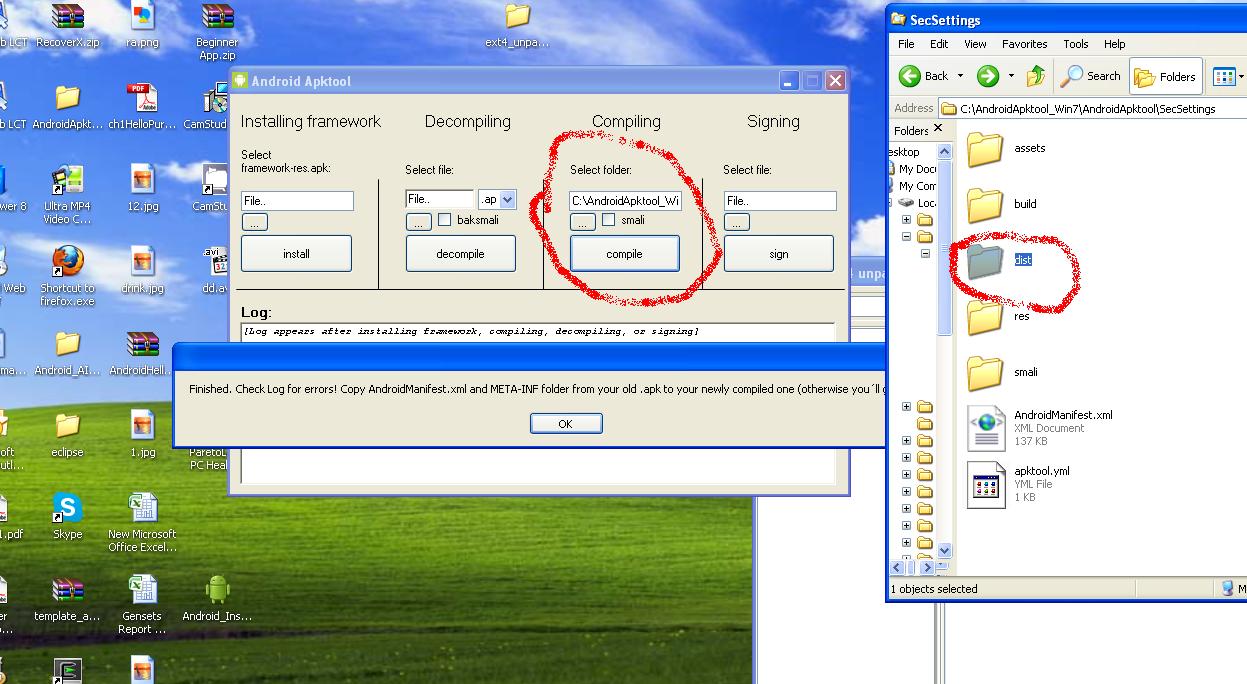
8. Open AndroidApktool.exe -> select Folder Secsettings ->

Click compile tab while jumping finished check log for error ... please check

Folder Secsettings new folder will appear 1 named dist.

9.Open Folder​ dist Click on SecSettings.apk-->opend with winrar​ (new apk)

10​. Back to Desktop then click on SecSettings.apk-->opend with winrar  (old apk)

11. Download AndroidManifest.xml and META-INF from (old apk) go to (new apk) select "store"

12 Finally, just copied it into the phone and then using root explorer or root

broswer to ferries system / app to change the old Sesetting.apk Stadium

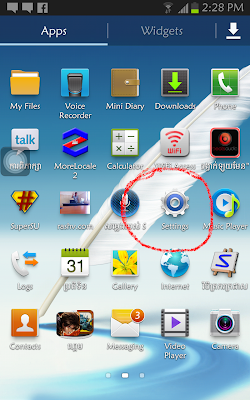
Vinyl. Result is obtained as the image below:
 

+Can watch the video below or Click here
 
*Hope this article can help to improve the script and can benefit all.

Resource : rashv

Monday, October 21, 2013


Android root is free without any charges.
Program that is safe and secure without risk.
Android root easy to use.
Supports almost every Android device and version of Android.


Size : 23.68MB
Download